Getting started
Brig documentation
On this page
Brig gives a coding agent a machine of its own: a microVM on your computer. You decide what the agent can read, write and reach.
brig run claude ~/code/demobrig run does.Let the agent run unattended. It works in the project you name, and the rest of your machine is out of its reach. When you are done, remove the sandbox and start clean.
See it run #
~.What you control #
- A machine for the agent. Each agent runs in a microVM with its own Linux kernel, behind a hardware boundary.
- You choose the files. Name one project, and the agent reads and writes there. Brig mounts that project and a home for the agent's settings. Nothing else on your machine is mounted.
- You choose the credentials. A sandbox starts with none. Deliver the ones the agent needs. Your keychain and your SSH agent stay out of reach.
- You choose the network. Each sandbox gets a network of its own. On macOS, attach an egress policy and the agent reaches only the hosts you allow.
- You open the ports. Publish a port, and the agent's dev server is on
localhost. No other port is open. - Signed images. Brig checks the guest image signature before boot.
- A clean start.
brig rmremoves the sandbox. Your project stays where it is. - Open source. Brig, hull and hvi are Apache 2.0. Runtimes gives the licence of every component.
Security model shows each boundary in detail.
What you can run #
| Agent | Command |
|---|---|
| Claude Code | brig run claude |
| Codex | brig run codex |
| Gemini CLI | brig run gemini |
| Grok CLI | brig run grok |
| opencode | brig run opencode |
| Claude Desktop, on macOS | brig run desktop |
| A plain Ubuntu shell | brig run ubuntu |
brig agent ls lists them on your machine. Built-in profiles prints each spec. To run your own agent or your own image, see Agent profiles and Guest images.
Minimal example #
Install Brig:
brew tap brig-sh/brig
brew trust brig-sh/brig
brew install --cask brigcurl -fsSL https://brig.sh/install | shCheck the host. A !! line prints its fix beside it.
brig doctorRun an agent on a project:
mkdir -p ~/code/demo
brig run claude ~/code/demo
The first run pulls the guest image and the boot assets, so it is slow. Brig prints brig: image and boot assets verified. Then Claude Code asks you to log in inside the sandbox. Inside the agent, pwd prints /work/demo.
brig network publish claude 3000   # the agent's dev server, on localhost:3000
brig stop claude                   # stop the sandbox, keep its name
brig rm claude                     # stop it and remove it
brig rm also deletes the guest home that Brig created. None of these commands touches ~/code/demo.
The boundary #
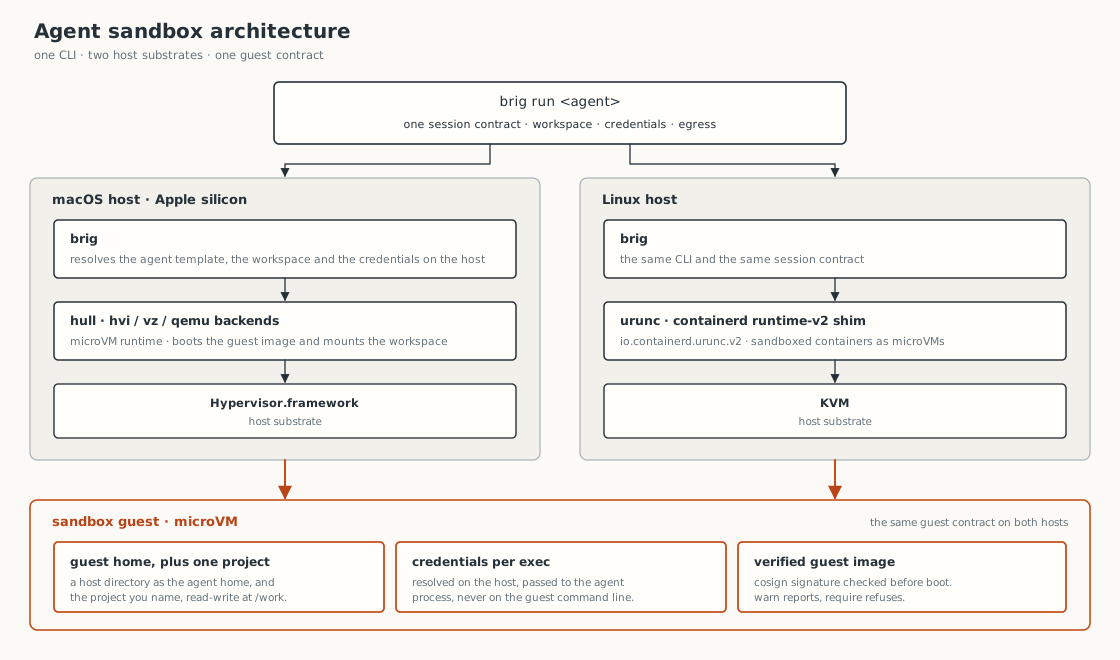
brig run resolves the session on the host and boots it as a microVM. On macOS the runtime is hull. On Linux it is urunc over KVM. Both give the guest a guest home, the project mount, credentials passed per exec, and a signed image. Runtimes has the detail, and Architecture shows how hull and hvi are built.
Sessions #
A session is <agent> or <agent>@<label>. claude and claude@refactor are two independent sessions of the same agent. Each has its own sandbox and its own guest home. Sessions says what survives brig stop and brig rm.
Requirements #
| Host | Supported |
|---|---|
| Mac with Apple silicon, macOS 15 or newer | Yes |
| Linux, x86-64 or arm64 | Yes |
| Intel Mac | No |
Install covers macOS 14 and the per-profile limits.
Next steps #
brig secret import.
Restrict the networkAllow only the hosts you name, with an egress policy.
Run your own agentThe profile file format.
Fix a failed runOrganized by the error you saw.
Ask a questionWhere to ask, and where to file a bug.